
Audience
Cleaning technicians
Objectives
Learn how to appropriately greet clients, introduce yourself, and ask questions according to company standards.
Responsibilities
Instructional Design, eLearning, Storyboard
Platforms
PowerPoint
Articulate Storyline 360
Adobe Photoshop
Adobe Illustrator
Scenario-Based eLearning Training
This scenario-based training is part of the basic skills training for a cleaning company. Cleaning Technicians apply the correct way of greeting a customer when they arrive at the house they clean. The goal is to improve communication and set a relationship between customers and cleaning technicians.
Overview
The client is a residential cleaning company. This project was created as part of basic training for new cleaning technicians and as a refresher for veteran technicians.
The owner wanted technicians to greet customers according to company standards when they arrived at customers’ houses. There were specific phrases technicians should use to show respect and value to the clients.
Before designing the training, I looked at the company’s existing documents. These included training manuals and videos. I also met with the company’s owner, who was my subject matter expert throughout the process.
The problem
I conducted an interview with my SME. I asked him several questions, including how technicians were currently trained on the customer greeting process, the procedure, etc. As the interview went on, my SME mentioned that all technicians knew the script by heart, but they were not consistent in following the script. Another problem resulted when the crew leader was absent, and the substitute did not follow through with the greeting process.
Process
After gathering all the information and talking to my SME, I began the design process. The current training manual had most of the information I needed in text form. I used that as a guide and translated it into an eLearning course.
I created the whole eLearning experience from action mapping, storyboarding, mockups, writing a script, and editing images to delivering the actual product.
Action Map
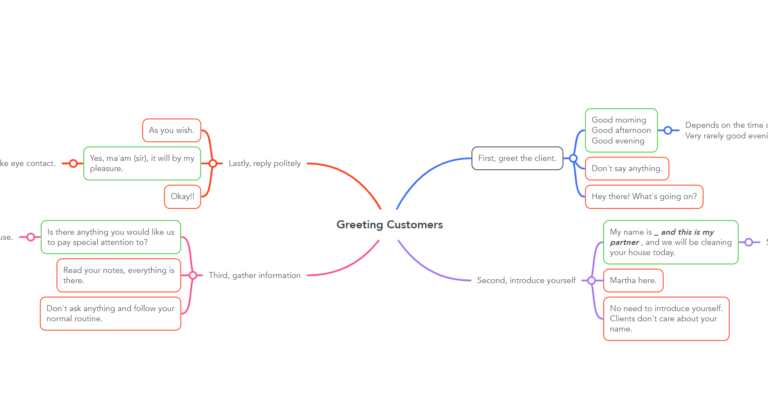
To get a clear picture of how the company owner wanted technicians to greet customers, we reviewed the training manual, updated some of the main points, and clarified others. The standard procedure consisted of four steps. My Subject Matter Expert had clear expectations; therefore, the course was easy to map.
Storyboarding
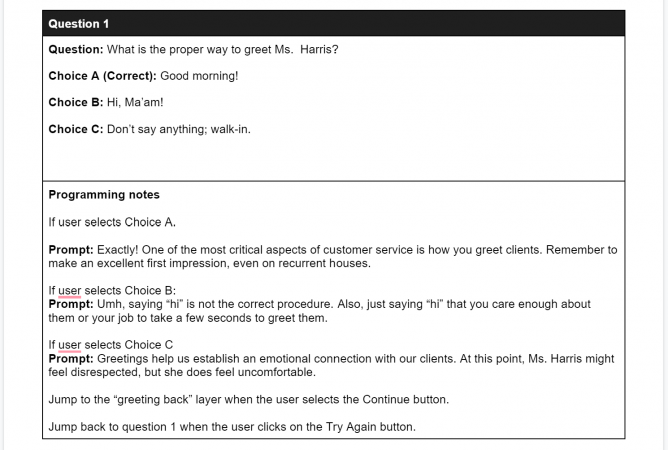
To start the development stage of this eLearning project, I created a
text-based storyboard. The greeting process for this company consists of four different steps. So I wrote questions with the correct and incorrect answers. Each answer had a further consequence.
I spoke to the SME to identify the consequences of different actions. Although the greeting process did not affect the quality cleaning quality, most clients had mentioned they sometimes did not have a great first impression of the cleaning technicians. Sometimes they thought they were rude or didn’t speak English at all.
Visual Mockups
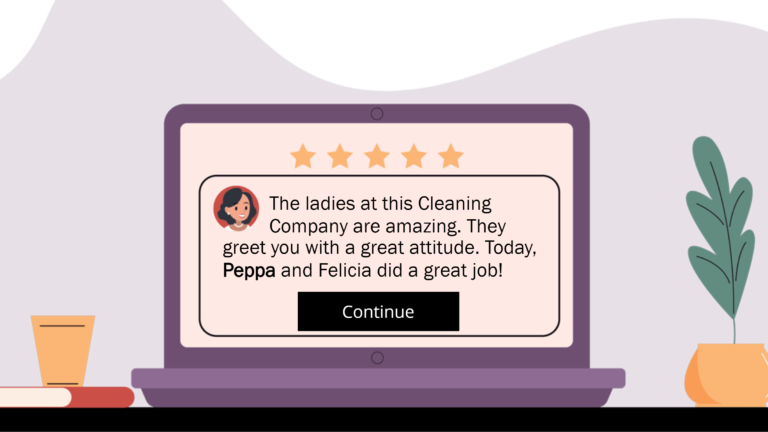
I started working on visual mockups upon receiving approval on the text-based storyboard. I used Adobe XD to create them. We needed four different backgrounds to set the place of the story, such as outside the house, the living room, the kitchen, and the computer.
We used purple as the primary color because that is the company’s color. First, I used images from Freepik to create the backgrounds. Then, I edited the vectors with Adobe Illustrator and Photoshop.
The characters were a huge part of the project. I downloaded different characters from Freepick and created four other characters to fit the company’s dress code. All technicians in this company are women, so my SME and I decided to stick with female characters. On the other hand, the company’s manager is a male, so we decided to create a male character so that technicians relate to it more.
Instructions are displayed on a white box. Questions are displayed on the right-hand side of the screen, while feedback is on the left-hand side. I just used black and white for the boxes and the font.
Visual Storyboard
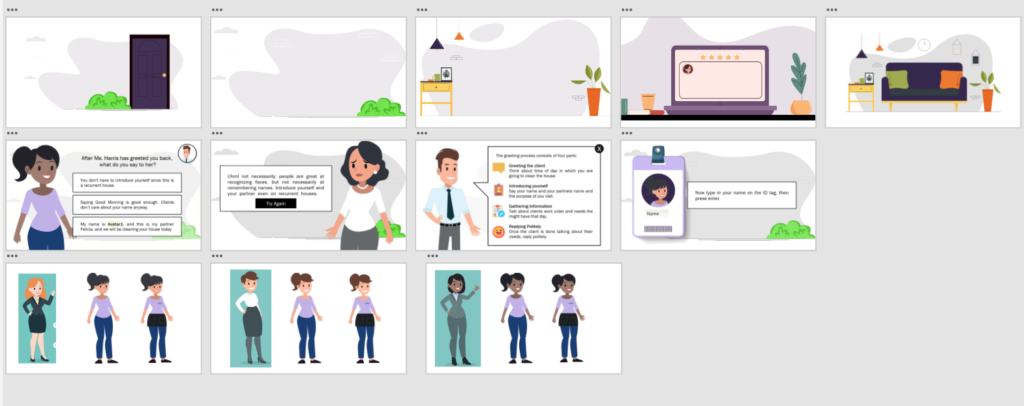
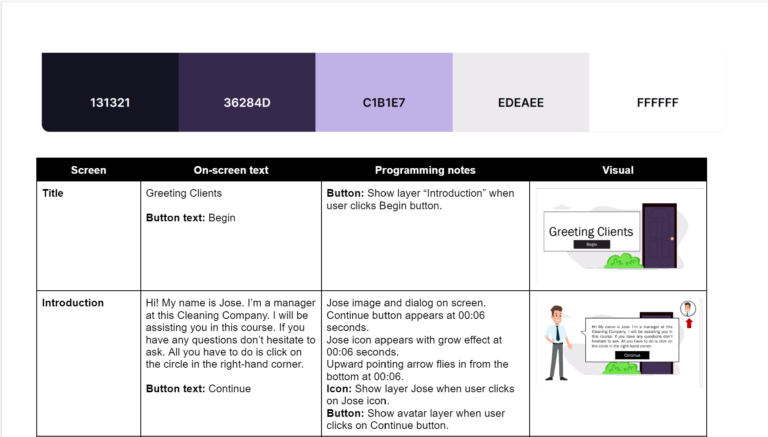
The company owner gave his okay on the visual mockups. Then, I proceeded with a visual storyboard to put together the text-based storyboard and the mockups. This way, my SME had a clear picture of the project. I wrote down the on-screen text and the programming notes using Storyline language.
Prototyping
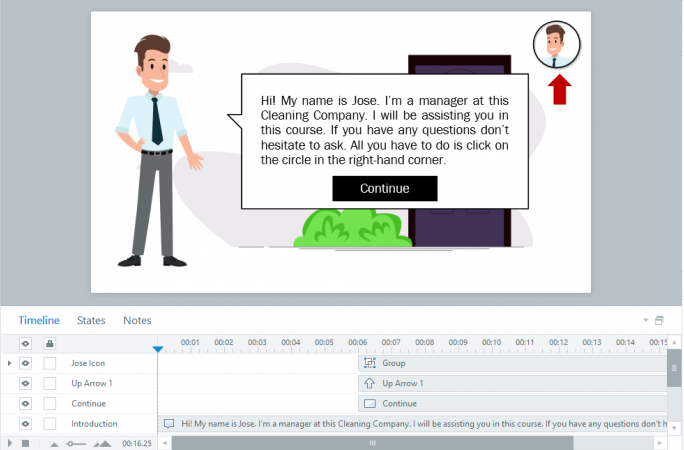
Once the client okayed the storyboard, I created a prototype on Storyline. The prototype consisted of the introduction, one avatar to choose from, an introduction to the mentor, and the first question and answer choices.
I uploaded the prototype to Review 360 for the SME to review. He liked the project and said that he followed the typical day of a cleaning technician.
He also commented and suggested the project’s interactivity. For example, he recommended adding a ringing bell and opening the door. He also recommended giving a name to the mentor. So, Jose came to live.
We updated some of the answer choices on the questions because it was too easy to see what the right choices were; thus, we had to adjust the feedback to match the answer choice. Another change was graying out wrong choices once the learner had selected them.
I made the changes, and my SME was excited about how the project was coming together.
Full Development
And now, we were ready to develop the entire project. The prototype was the base of the project, but we were still to develop the whole storyline. In a way, I felt like I was playing Mario Bros. You must pass levels to get to Princess Peach Toadstool without abandoning the storyline. It was fun. So, before each question, I added different transitions. I included dialog, animations, and instructions for the learner to achieve a smooth learning experience. Also, I had the learners input their names at the beginning and used them throughout the module. This took a lot of graphic design and programming skills. I had to adjust the characters to different situations and change scenes. Regarding programming, I created variables and added conditions to triggers in Storyline.
I also developed a bilingual version for English language learners when the project was done. The instructions and questions were in Spanish, but the answer choices were in English.
Takeaways
The final product was delivered before schedule. The company owner was pleased with the results and the timely manner I finished the eLearning course. He was excited because so far, he or his manager were the ones doing all the training. He loved the product’s interactivity, but especially the immediate feedback once a wrong choice was made.
The cleaning technicians also welcomed the product. The feedback said it was less intimidating than having the actual owner giving the training presentation. They said they were more aware of how their decisions could impact the company and potentially their job. It also prompted a discussion about how well they’ve performed their work before.
I enjoyed working on this project from the beginning to the end. Although I was proficient with Adobe products, I feel even more confident now. Helping this client find a solution to a problem felt rewarding.